

Can You Integrate Smart Home Tech With Espresso Setups?
Last Updated: October 28, 2026
Quick Summary
You can integrate smart home espresso setups by using a smart plug, app or hub to switch your machine on, warm it up and shut it down without standing at the counter. The automation happens at the socket, not inside the machine, so it suits machines with a plain rocker switch best.
- Check the plug's maximum load against the machine's wattage and leave headroom rather than running at the limit.
- A single-boiler machine often draws around 1,200 to 1,600 W during warm-up.
- Choose a plug that stores schedules locally so routines survive a router reboot or outage.
- Give the machine its full warm-up of commonly 15 to 30 minutes before brewing.
- Automation stops at the brew lever, grinder and milk, which still need a person.
Table of Contents
- Why Smart Home Espresso Automation Is Worth Setting Up
- Choosing a Smart Plug for Espresso Machine Control
- Espresso Machine Smart Home Automation: Platforms and Protocols
- Espresso Machine Safety and Smart Plugs: What to Get Right
- Building an Automated Coffee Routine That Actually Works
- Machine-Specific Compatibility and Where Automation Stops
- Choosing Espresso Equipment That Fits Your Smart Setup
- Frequently Asked Questions
Why Smart Home Espresso Automation Is Worth Setting Up
Integrating smart home espresso automation means using a smart plug, app or hub to switch your machine on, warm it up and shut it down without standing at the counter.
The honest version is less glamorous than the videos. Most espresso machines have a mechanical rocker switch, not a smart one.
That distinction shapes everything below. This guide covers how to plan a setup, which parts to consider and where automation stops being useful.
Choosing a Smart Plug for Espresso Machine Control
A smart plug for espresso machine control is a Wi-Fi or hub-connected socket that switches power to the machine on a schedule or by app. It works well with simple rocker-switch machines and badly with anything that needs a button press to start a brew.
Power Rating and Boiler Load
Check the plug's rating against the machine's stated wattage before you buy anything. A boiler draws a large current for several minutes during warm-up, and that surge is the part that melts cheap hardware.
- Match the plug's maximum load to the machine's label, with headroom to spare
- Choose a plug with a physical button, so you can still override it
- Avoid plugs that feel light or list vague ratings
A dual boiler machine pulls harder than a single boiler. Check your machine's specifications against your plug's rating first.
Momentary Switches and Machine Compatibility
Machines with a momentary switch will not work with a smart plug alone. These switches spring back when released, so restoring power does nothing until someone presses the button again.
Watch out: if your machine has a touch panel or a soft-start button, a smart plug gives you warm-up and shutdown only. It will never start a brew for you.
Espresso Machine Smart Home Automation: Platforms and Protocols
Espresso machine smart home automation runs on three layers: the plug, the platform and the routine. Get the layers right and the whole thing behaves; get them wrong and you spend your mornings troubleshooting instead of drinking coffee.
The layer most people underestimate is the protocol. The plug you choose determines which hubs, apps and voice assistants can talk to it, whether your schedule survives an internet outage, and how much latency sits between the trigger and the relay clicking.
Wi-Fi plugs
Wi-Fi plugs connect straight to your router and work with most manufacturer apps. They need no hub, which makes them the cheapest entry point, but each plug occupies a Wi-Fi client slot and depends on your router staying up. Cloud-dependent models will not run a schedule if the broadband drops, even though the plug itself is still powered.
Zigbee and Thread plugs
Hub-based plugs use Zigbee or Thread and need a home hub, a SmartThings, Home Assistant or similar controller, to translate commands. The advantage is a mesh that stays reliable as you add devices, and local execution: routines run on the hub, not in a vendor cloud. The trade-off is the upfront cost of the hub and the fact that you are now maintaining two systems instead of one.
Matter-certified plugs
Matter-certified plugs aim to work across platforms without lock-in. In practice, Matter support varies by hub firmware, and some early Matter plugs expose only basic on/off to third-party platforms while hiding energy monitoring behind the vendor app. Check the certification and the firmware version before assuming cross-platform control.
Local control versus cloud control
A common pattern among experienced users is to prefer local control wherever possible. Local routines keep working when the internet is down, respond faster, and do not depend on a vendor keeping a server online. Cloud control is easier to set up and usually gives better app polish, but it introduces a point of failure between you and your espresso.
Voice assistants and scenes
Once the plug is on a platform, you can expose it to a voice assistant and build scenes, "good morning" switching the machine on alongside the kitchen lights, for example. Keep the voice layer as a convenience, not the primary trigger: a voice command that fails silently is worse than a schedule that always fires.
Bridging into a wider system
For bridging a machine into a wider system, a dedicated module such as the Jura Business Smart Connect X Line shows what proper connectivity looks like when it is built in rather than bolted on. If you are weighing a native module against a plug-and-hub approach, compare the cost of the module with the combined cost of plug, hub and your time.
A quick comparison
| Approach | Hub needed | Works offline | Setup effort | Best for |
|---|---|---|---|---|
| Wi-Fi plug | No | Only if schedules are stored locally | Low | Single machine, simple schedule |
| Zigbee/Thread plug | Yes | Yes, routines run on hub | Medium | Homes already using a hub |
| Matter plug | Usually | Depends on hub firmware | Medium | Mixed-platform households |
| Built-in module | No | Varies by vendor | Low once installed | Machines bought with connectivity in mind |
Whichever route you take, the platform decision should follow the machine decision, not precede it. A brilliant hub cannot rescue a machine whose switch will not accept remote power.
Faema Faemina Espresso Machine - 1 Group, Automatic, Home Machine, Voice →
Espresso Machine Safety and Smart Plugs: What to Get Right
Espresso machine safety and smart plugs come down to heat, water and unattended power. The machine sits near a tap, steams at high temperature and draws serious current. Treat the socket as part of the machine, because electrically it is.
Current ratings and why they matter
A domestic socket circuit in the UK is typically rated at 13 A, and a smart plug is usually rated well below the 3 kW that a 13 A circuit can deliver. A single-boiler espresso machine often draws in the region of 1,200 to 1,600 W during warm-up; a dual-boiler machine can pull closer to 2,400 to 3,000 W when both boilers heat at once.
Relay behaviour and fail-safe states
Inside a smart plug is a relay, an electromechanical switch that the electronics drive. Relays have a rated current and a rated number of operations, and they can fail closed (stuck on) as well as open (stuck off). A plug that fails closed leaves the boiler energised with no way to cut it remotely, which is why a physical switch on the plug and an accessible wall socket matter.
Grounding and the socket
Never defeat the earth connection. Use a plug that maintains a proper earth path, plug directly into a wall socket rather than through an extension lead, and do not daisy-chain adaptors. If the socket is near the sink or within a splash zone, have the circuit protected appropriately, a residual current device (RCD) on the circuit is the baseline protection against earth faults, and a qualified electrician should confirm the arrangement.
Boiler warm-up behaviour
A boiler draws its heaviest current during warm-up and then cycles on and off to hold temperature. That means the load is not constant, and the plug sees repeated inrush events rather than one steady draw. Give the machine its full warm-up, commonly 15 to 30 minutes depending on the boiler size and group head, rather than switching it on and brewing immediately, and avoid rapid on-off cycling that stresses both the relay and the heating element.
When to call a qualified electrician
Anything beyond plugging a smart plug into a wall socket is electrician territory. That includes hard-wiring a smart switch in place of a fused spur, modifying the machine's internal wiring, adding a relay inside the casing, or changing the circuit that feeds the machine. If you are unsure whether a circuit can carry the load, that is a question for a qualified electrician, not a forum.
Monitoring and recovery
A plug that reports energy use lets you verify the machine actually came on rather than assuming it did. Set an alert if the plug goes offline, and keep a manual override on the plug button so you can cut power by hand if the app misbehaves.
If anything feels hot to the touch, stop and change the setup. Warm is normal; hot is a warning.
Building an Automated Coffee Routine That Actually Works
A good automated coffee routine is short, repeatable and built around warm-up time. Here is the sequence we would use:
- Set the switch-on time for 20 to 30 minutes before you get up
- Add a status check so you know the machine is live
- Set a hard shutdown for mid-morning
- Keep a manual override on the plug button
- Add a notification if the plug reports offline
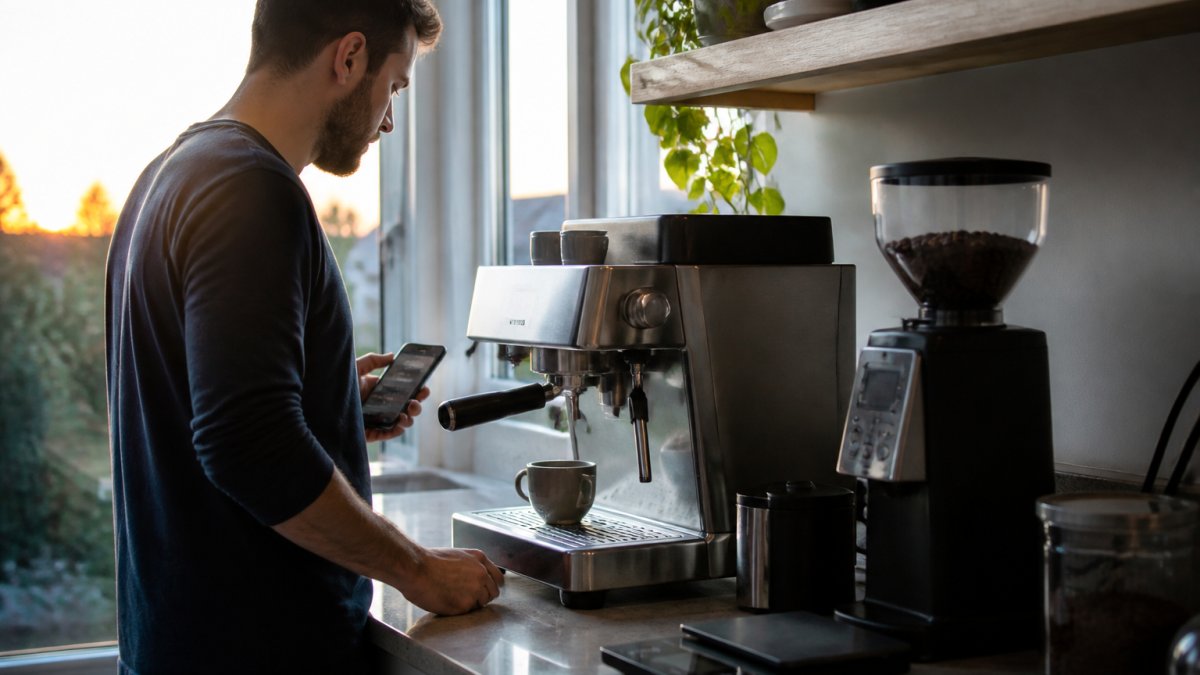
If you are setting this up for an office, read our guide on how to choose a commercial coffee machine for a small office before you commit to a schedule.
Machine-Specific Compatibility and Where Automation Stops
Automation stops at the brew lever, the grinder and the milk. Those steps need a person, a portafilter and fresh grounds.
Where automation genuinely helps is the boring part: warm-up and shutdown. Machines that already handle the smart layer natively, like the Faema Faemina Espresso Machine with its voice recognition and app control, skip the plug entirely.

A common mistake is buying a plug first and checking the machine's switch second. Do it the other way round.
Choosing Espresso Equipment That Fits Your Smart Setup
Equipment choice decides how much automation you get. Machines with a plain rocker switch are the easiest to automate. Touch panels and app-controlled models need less help.
| Machine type | Switch type | Smart plug works? | Best approach |
|---|---|---|---|
| Basic rocker switch | Mechanical | Yes | Smart plug on a schedule |
| Momentary button | Spring return | Warm-up only | Manual brew, timed power |
| Touch panel | Electronic | Limited | Built-in app control |
| App-controlled | Native | Not needed | Use the machine's own app |
Frequently Asked Questions
Can you control an espresso machine with a smart plug?
Yes, if the machine has a physical switch that stays in the on position and starts brewing or heating as soon as power returns. A smart plug for espresso machine control simply cuts and restores mains power, so the machine's own switch must be left on. Machines with momentary or soft-touch buttons that need a press after power-up will not start on their own. Check the plug's power rating against your machine's load before relying on it.
How do you schedule an espresso machine to warm up before you wake up?
Set a scheduled start in your smart plug's app or home automation routine for 20 to 30 minutes before your alarm. Leave the machine's switch on and confirm the boiler reaches brew temperature by the time you arrive. Test it over a few mornings and adjust the lead time to your machine's warm-up. Pair the schedule with a notification so you know the plug actually switched on.
Is it safe to leave an espresso machine switched on with a smart plug?
Only with care. A smart plug does not add safety features your machine lacks, so a machine with no low-water cut-off or thermal protection should not be left unattended. Use a plug rated for the machine's load, keep it away from steam and water, and avoid daisy-chaining extension leads. If your machine's instructions say it must not be left unattended, follow them and use the plug for short pre-warm windows only.
Which smart home systems work with espresso machine automation?
Any platform that controls a smart plug will work: app-based plugs, hub systems and voice assistants can all switch power on a schedule or on command. For deeper control, automation platforms and ESPHome-based microcontrollers can add status monitoring and routines. The limiting factor is rarely the platform and almost always the machine, because the espresso machine must resume heating by itself when power returns.
The challenge is that most machines were never designed to be switched by an app, and the wrong plug or schedule can leave you with cold coffee or a warm socket. We stock machines built for precision and consistency, from home setups to commercial installations, with water solutions and cup warmers to complete the setup. Get started with Coffee Craft Studio and build an espresso routine that is hot, ready and safe every morning.
